Deep Dive · Jun 30, 2026 · 7 min read
Designing Reliable AI Agents: Tool Use, Control Loops, and Failure Modes
An agent is a loop with tools and limits. Here is how to build one that behaves predictably in production.
 Short version← AI Agents Explained: When Automation Needs to Think
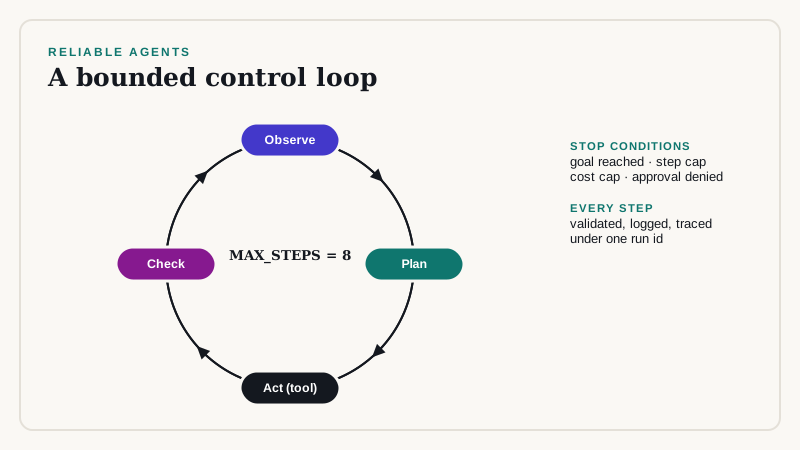
An agent is a model inside a loop. It reads the goal and the history, chooses a tool to call, observes the result, and repeats until it decides it is done. Reliability comes from the loop around the model, not from the model.
The control loop
MAX_STEPS = 8

def run_agent(goal, tools, gateway, approve):
    history = [{"role": "user", "content": goal}]
    for step in range(MAX_STEPS):
        reply = gateway.complete("agent", "large", history, tools=tool_schemas(tools))
        if reply.tool_call is None:
            return reply.text                      # model decided it is finished

        tool = tools[reply.tool_call.name]         # KeyError => model hallucinated a tool
        args = tool.validate(reply.tool_call.arguments)

        if tool.side_effects and not approve(tool.name, args):
            history.append({"role": "tool", "content": "DENIED by approver"})
            continue

        try:
            result = tool.run(**args)
        except Exception as e:                     # surface errors to the model, do not crash
            result = f"ERROR: {e}"
        history.append({"role": "assistant", "tool_call": reply.tool_call})
        history.append({"role": "tool", "content": truncate(result, 4000)})
    raise TimeoutError("agent exceeded MAX_STEPS")
Tool design
- Make tools narrow: one clear job and a strict JSON schema.
- Validate arguments in code before running anything.
- Separate read tools from write tools, and require approval for writes.
- Make write tools idempotent, so a retry does not duplicate an action.
- Return short, structured results; truncate large outputs.
{
  "name": "create_refund_draft",
  "description": "Create a DRAFT refund for review. Does not move money.",
  "parameters": {
    "type": "object",
    "properties": {
      "order_id": {"type": "string"},
      "amount_cents": {"type": "integer", "minimum": 1, "maximum": 50000},
      "reason": {"type": "string", "maxLength": 300}
    },
    "required": ["order_id", "amount_cents", "reason"],
    "additionalProperties": false
  }
}
Failure modes to design for
- Looping: the same call repeated. Detect duplicate calls and stop.
- Wrong tool or arguments: validate and return a clear error.
- Prompt injection through tool output: treat retrieved text as data, never as instructions.
- Runaway cost: cap steps, tokens, and wall-clock time per run.
- Partial failure: record each step so a run can be resumed or rolled back.
Observability
Log every step: the prompt, the chosen tool, the arguments, the result, token counts, and latency, under one run id. Without a trace you cannot debug an agent or explain its behavior to an auditor.
Evaluate trajectories, not just answers
Build test goals with expected outcomes and allowed tool paths. Score whether the final state is correct and whether the agent took forbidden or wasteful steps. Run the suite on every prompt, tool, or model change.
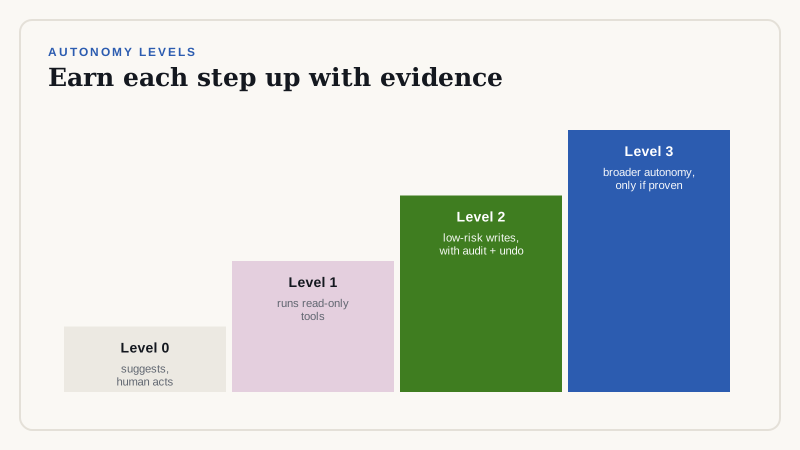
Autonomy levels
- Level 0: suggests actions, human executes.
- Level 1: executes read-only tools, human approves writes.
- Level 2: executes low-risk writes automatically with audit and rollback.
- Move up a level only when the evaluation results support it.
Planning strategies
Two patterns cover most business agents. In a reactive loop, the model picks the next action after every observation, as in the code above. In plan-then-execute, the model first writes a short plan, your code validates it against allowed steps, and the agent then executes the steps with limited room to deviate.
- Reactive loops handle surprises well but can wander. Use them for research and triage tasks with read-only tools.
- Plan-then-execute is more predictable and easier to audit. Use it for workflows that touch records or send messages.
ALLOWED_STEPS = {"lookup_order", "check_policy", "draft_reply", "create_refund_draft"}

def validate_plan(plan):
    if len(plan) > 6:
        raise ValueError("plan too long")
    for step in plan:
        if step["tool"] not in ALLOWED_STEPS:
            raise ValueError(f"tool not allowed: {step['tool']}")
    return plan
Memory and state
Keep the working history short. Summarize old steps instead of replaying them, and store durable facts, such as the customer id and decisions made, in a structured state object that your code owns. Never rely on the model to remember a fact that your system must get right.
Multi-agent designs: use sparingly
Splitting work across several cooperating agents looks elegant and multiplies failure modes, cost, and debugging effort. Prefer a single agent with well-designed tools. Split only when the sub-tasks need different permissions, different models, or independent evaluation, for example a drafting agent and a separate reviewing agent that cannot send anything.
Testing agents
Combine three kinds of tests. Unit tests check each tool in isolation, including bad arguments. Scenario tests give the agent a goal against a simulated environment with seeded data, and assert the final state and the allowed tool path. Adversarial tests inject malicious text into tool outputs and verify that the agent does not follow it.
def test_refund_requires_approval(agent_env):
    run = agent_env.run("Customer 118 wants a refund for order 5521")
    assert run.final_state["refund_draft"]["order_id"] == "5521"
    assert run.tool_calls[-1].name == "create_refund_draft"
    assert not agent_env.money_moved            # the agent can only draft
    assert run.steps <= 6
Cost and latency control
- Cap steps, tokens, and wall-clock time per run, and return a partial result with an explanation when a cap is hit.
- Use a smaller model for routing and a larger one only for hard reasoning steps.
- Cache read-only tool results within a run.
- Run independent read tools in parallel.
When not to use an agent
If the steps never vary, write a workflow. If an error is expensive and irreversible, require approval at each step or avoid autonomy. If you cannot define success in a test, you cannot yet evaluate an agent for the task. Many of the best production systems are plain workflows with one or two model calls inside them.
Governance checklist
- A named owner and a documented purpose.
- A list of tools and permissions, reviewed regularly.
- Trace retention and a review process for sampled runs.
- A kill switch and a rollback plan.
How we can help
We design agent workflows with explicit limits, approval points, and tracing, and we can review an existing agent for injection risk and runaway cost. Talk to us about a scoped pilot.
Related reading
Need help implementing this?
Our consultants run architecture reviews and build production pilots. Book a free scoping call to talk through your design.
Book a Free Scoping Callor email us at hello@deepvero.com