Case Study Guide · Jun 15, 2026 · 4 min read
Building a Customer Support Copilot: What It Takes
A support copilot drafts replies from your help content so agents can respond faster and more consistently. Here is how one gets built.
 Technical deep diveEngineering a Support Copilot: Retrieval, Drafting, and Review →Architecture, code, and trade-offs for engineers and technical leads.
Customer support is one of the most popular first GenAI projects, and for good reason. The work is frequent, the answers already live in your documentation and past tickets, and the benefit is easy to measure. This guide explains what a support copilot is and what goes into building one.
What a support copilot does
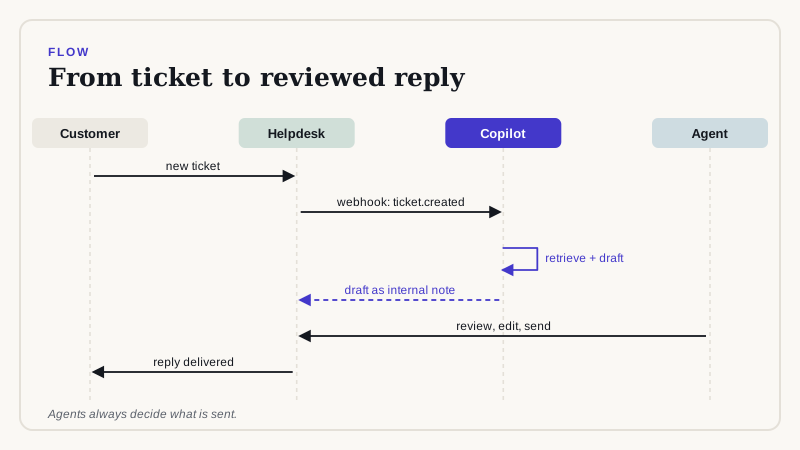
When a ticket arrives, the copilot reads it, finds the most relevant help articles and past resolutions, and drafts a reply. The agent reviews the draft, edits if needed, and sends it. The customer gets a faster, more consistent answer, and the agent spends less time searching.
The building blocks
- Knowledge sources: your help center, product docs, internal notes, and resolved tickets.
- Retrieval: a search step that finds the passages relevant to each ticket.
- Drafting: the model writes a reply grounded in those passages, in your tone.
- Review: a screen where the agent edits, approves, or rejects the draft.
- Feedback: a way to record which drafts were used so quality can improve.
Getting the content right
The copilot is only as good as the material it reads. Out-of-date articles produce out-of-date answers. Before building, review your help content, remove duplicates, and mark what is current. Many teams find this cleanup is as valuable as the AI itself.
Keeping it safe
Start with the agent always in the loop. Do not let the copilot send replies on its own, especially for billing, legal, or account issues. Add rules for topics it should not answer and have it flag low-confidence drafts instead of guessing.
How to know it is working
Measure before and after on the same things: time to first response, time to resolution, tickets handled per agent, and customer satisfaction. Also sample the drafts each week and check accuracy. Speed without accuracy is not an improvement.
A realistic timeline
- Week 1: choose the ticket types to start with and collect the content.
- Weeks 2 to 3: build the retrieval and drafting flow and test on past tickets.
- Week 4: connect to your helpdesk and pilot with a few agents.
- After launch: review results, tune, and widen to more ticket types.
Start with one queue and one team. When the numbers look good, expand. If you would like to explore a copilot for your support team, get in touch and we can scope it together.
Related reading
Want GenAI working in your business?
Book a free GenAI scoping call and we will help you pick the right first project.
Book a Free Scoping Callor email us at hello@deepvero.com