Deep Dive · Oct 23, 2026 · 7 min read
Document Extraction Pipelines for Invoices and Forms
OCR, layout, structured extraction, validation rules, and human exception handling for back-office documents.
 Short version← Automating Invoices and Back-Office Paperwork With GenAI
Document automation is an engineering pipeline where the language model is one step. Most accuracy comes from good parsing and strong validation rules.
Stages
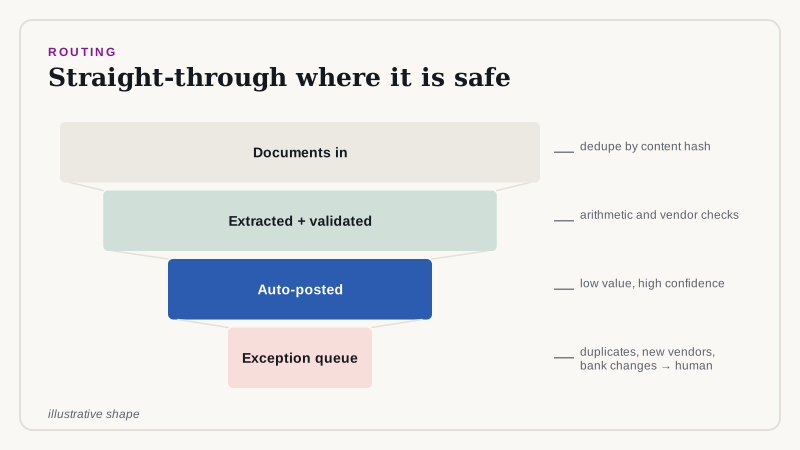
- Ingest: email, upload, or EDI, with deduplication by content hash.
- Parse: OCR for scans and layout analysis for tables and key-value regions.
- Extract: map content to a fixed schema.
- Validate: business rules and cross-checks.
- Route: auto-post, review, or reject.
Schema-first extraction
from pydantic import BaseModel
from decimal import Decimal
from datetime import date

class LineItem(BaseModel):
    description: str
    quantity: Decimal
    unit_price: Decimal
    amount: Decimal

class Invoice(BaseModel):
    vendor: str
    invoice_no: str
    issue_date: date
    currency: str
    lines: list[LineItem]
    subtotal: Decimal
    tax: Decimal
    total: Decimal
Validation rules
Rules catch silent extraction errors. The strongest is arithmetic: lines must sum to the subtotal, and subtotal plus tax must equal the total.
TOL = Decimal("0.01")

def validate(inv: Invoice, known_vendors, seen_numbers):
    errors = []
    if any(abs(l.quantity * l.unit_price - l.amount) > TOL for l in inv.lines):
        errors.append("line amount mismatch")
    if abs(sum(l.amount for l in inv.lines) - inv.subtotal) > TOL:
        errors.append("subtotal mismatch")
    if abs(inv.subtotal + inv.tax - inv.total) > TOL:
        errors.append("total mismatch")
    if inv.vendor not in known_vendors:
        errors.append("unknown vendor")
    if (inv.vendor, inv.invoice_no) in seen_numbers:
        errors.append("possible duplicate")
    return errors
Routing
- No errors and high confidence: post automatically, for low-value invoices only.
- Any error: send to the exception queue with the errors highlighted.
- Duplicate or unknown vendor: always human review.
Measure field-level accuracy
Track accuracy per field, not per document, on a labeled sample. Straight-through processing rate and exception handling time are the business metrics.
Controls
Keep segregation of duties: the system proposes, a person with authority approves. Store the original document, the extraction, and every change for audit.
Handling layout variety
Invoices arrive in thousands of layouts. A single extraction prompt works surprisingly well for many, but accuracy drops on unusual formats, multi-page tables, and poor scans. Track accuracy per vendor, and for your highest-volume vendors add a template or a few-shot example that shows the exact layout.
- Multi-page tables: carry the header row onto each page before extraction.
- Rotated or skewed scans: deskew before OCR.
- Handwriting and stamps: flag low OCR confidence for review instead of guessing.
- Multiple languages and currencies: normalize formats and validate the currency code.
Matching to purchase orders
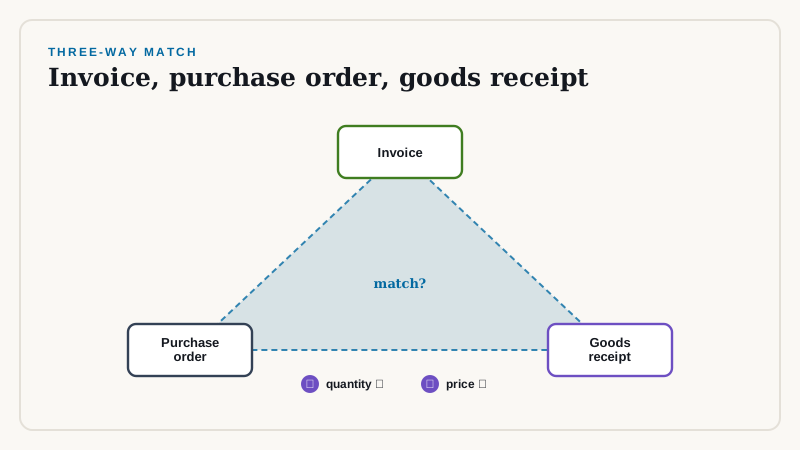
Three-way matching compares the invoice with the purchase order and the goods receipt. The model extracts and normalizes; deterministic code performs the match and flags differences in quantity, price, or terms.
def match_po(inv, po, price_tol=Decimal("0.02"), qty_tol=0):
    issues = []
    po_lines = {l.sku: l for l in po.lines}
    for line in inv.lines:
        p = po_lines.get(line.sku)
        if p is None:
            issues.append(f"{line.sku}: not on PO"); continue
        if abs(line.unit_price - p.unit_price) > p.unit_price * price_tol:
            issues.append(f"{line.sku}: price differs")
        if abs(line.quantity - p.quantity) > qty_tol:
            issues.append(f"{line.sku}: quantity differs")
    return issues
Confidence and thresholds
Compute a document-level confidence from OCR quality, validation results, and field-level agreement between two extraction passes. Auto-post only above a threshold chosen on a labeled sample, and lower the threshold gradually as accuracy proves out.
Operating metrics
- Straight-through processing rate: documents posted without human touch.
- Field accuracy for the fields that drive payment: vendor, total, date, bank details.
- Exception handling time and backlog.
- Duplicate and fraud catches.
Fraud and risk
Changes to bank details, new vendors, and unusual amounts are common fraud signals. Never auto-approve these. Route them to a verified call-back process owned by finance, regardless of how confident the extraction is.
Rollout
Run in parallel with the manual process for a few weeks and compare results field by field. Expand by document type and vendor group, starting with the cleanest, and keep a human review route open permanently for exceptions.
How we can help
We build extraction pipelines integrated with your ERP or accounting system and measure field-level accuracy on your own documents. Contact us to scope one.
Related reading
Need help implementing this?
Our consultants run architecture reviews and build production pilots. Book a free scoping call to talk through your design.
Book a Free Scoping Callor email us at hello@deepvero.com